February, 2008

Chinese immigration – how did I do today?

Today is one of those days. A meeting in Zhuhai at 11am. Take the 08:40 ferry from Hong Kong, no problem. I’d researched the ferry times, got to the ferry port with loads of time to spare and went up to the ticket counter. “Ticket to Zhuhai please”. Suddenly there was an earlier 8am ferry leaving in five minutes, if I run I could catch it. “You’re sure this goes to Zhu…” I started to ask, but the man behind the counter cut me off. “Yes it goes to zhunzen, now hurry!” but I didn’t hear him correctly, I was focussed on a boat leaving earlier than expected, and that would definitely get me to my meeting on time. Communication Breakdown. It was only as the ferry left Hong Kong and turned right rather than left I realised my mistake. I was on the boat to Shenzen.

But that is not the purpose of this post. Arriving in China, when going through passport control, under the glass window there is a little box with three buttons on it, inviting you to rate your experience – green for perfect, yellow for satisfactory and red for unsatisfactory. Capturing customer feedback at the time of the experience. Howe much more valuable is that than asking customers to complete a lengthy questionnaire some time later, after the event. I think that websites could learn from this. Rather than a pop-up inviting customers to complete a questionnaire of a number of pages (often this appears just as you start your experience at the site), why not get customers to “rate this page” or “rate your experience” as a simple thumbs up or down (as you might Digg comments). This will provide instant feedback, maybe not qualitative, but quick and simple quantative data.

And if I had the ability to rate today? Right now, as I sit in a dingy cafe waiting the two hours for the next ferry back to Hong Kong, with a rapidly flattening laptop battery, I’d have to press the thumbs down, unsatisfactory red light on my current experience.
Real world forms

In the real world, when I get an application form I’ll flick through the pages and have a look at what is required. I can choose which fields I complete in whatever order I like. If I want to take a break half way through I can. I can complete it when I like and how I like.

So why aren’t web forms like that?

The usual format for a web form starts with some copy that describes the form (which people skim through at best). The user clicks to the next page and the form commences. There may be a step indicator showing progress through the form, but almost certainly progress through it will be linear. You have to complete each page before progressing to the next. If you are lucky you’ll be able to click to previous completed steps. But the experience is nothing like a real-world form. And when was the last time a real-world paper form “timed out” half way through, demanding the user to start over again if they left it idle for ten minutes?

The web forms we see today are a relic of their tecnological past. There is no reason why they must be linear, (and if there is logic in the form, there is no reason why the user can’t explore the different routes – you do that with a paper based form). There is no reason why the user can’t click to whatever page in the process they like (just like with the paper form). There is no reason why a page must be completed before progressing to the next. There is no reason why the form should time out and forget everything the user has entered. Fields can be saved as they are completed against an anonymous user, until the user wants to provide personal credentials.

Bottom line – the web has moved on. Instead of reflecting technical constraints of yesterday, it can adopt more real-world metaphors. But do we have the courage to start introducing new paradigms? Are users, information architects and usability experts so ingrained with broken web metaphors that they will shun a new model, (a real world model) of completing a form?

So here’s a rough example. It’s an application form for a savings account. Ignore the content, field labels etc, it is more the model that is illustrated.

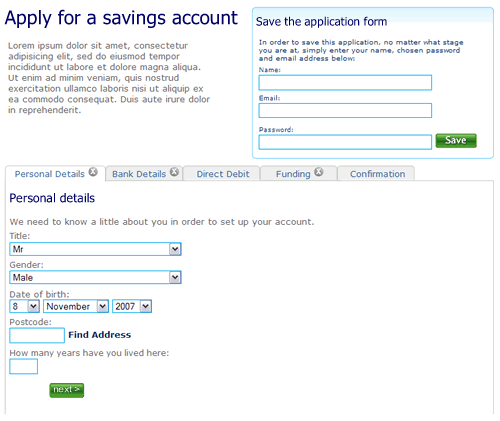
1. The user can move between the sections (tabs) to see the fields that are required. There is clear feedback on each tab that it has not been completed. The “Direct Debit” section is optional hence no indicator. The ability to save the application is seperate.

Application form, step 1, nothing filled out

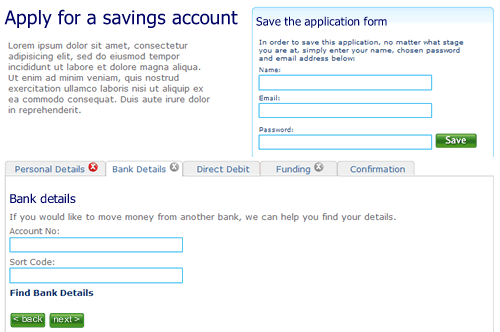
2. The user selects “Bank details”. They’ve not filled out all the fields on the first tab “Personal details”, but it doesn’t matter. There is clear feedback that this tab is yet to be completed.

Second tab on the application form, the first tab has not been completed

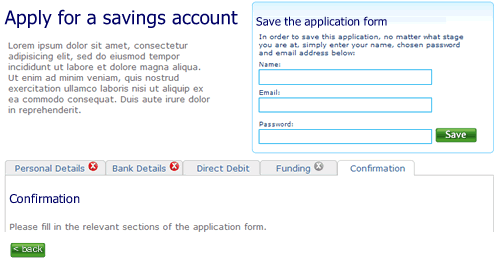
3. The user clicks right through to the confirmation tab. There is nothing to confirm so the page remains blank, with a prompt to fill out other sections.

Step 3 of the application form

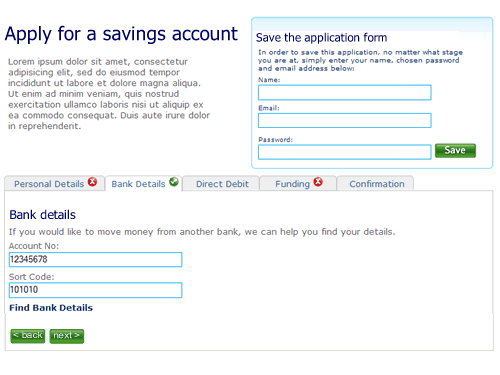
4. When sections are completed the indicator on the tab changes to show completion. Here the user has completed step two ahead of step one.

almost there

5. Finally, when all sections are completed the user can review the entire form.

Confirmation screen

I’m not saying this is perfect, it’s a start. A start to re-thinking the way we design forms on the web and think about modelling them on real world behaviour instead of technical constraints of the past.

What about the non-functionals?

Non-functional requirements (NFRs) are the poor, ugly sisters to the functional requirements. They are often left out, or worse written in wooly and non SMART terms; “the website shall be available 24/7”. Is this what happened with HMRC? The website that allows UK citizens to complete their tax returns on-line has gone down, just as the deadline looms. I wonder if this is a case of the non-functional requirements around performance, scalability volumes etc being forgotten about or just not tested for. Inexcusable really.