Archived entries for

Zen and the art of sitting at your desk

We are creatures of habit. I was recently on a gig where we were helping a client innovate, creating a vision for a new product. When I wasn’t out talking to or observing users I was in our “war room”. Four weeks sitting in same seat; every day the four of us in the project team sat at the same place in the room. When our sponsors came into the room they sat in the same seats. Habit. Retuning to the comfort of our “spots”.

In organisations that promote hotdesking, people will still naturally move towards the same seat. People have their “spots” that others soon recognise. Same seat, same view. Can’t sit there, that’s Jacks desk.

In our room anything we produced went on the walls. I faced the processes. My colleague opposite me faced the personas and their descriptions. This view undoubtedly influenced our thinking. Reflecting on the four weeks, I was more process orientated, my colleague moew persona orientated. Because process was what I was looking at and personas what he looked at.

A long time ago I spent a while in the foothills of the Himalayas in India at a Buddhist retreat. When entering the meditation hall the natural thing to do was to go to the same place. The teacher said don’t do this. Returning to the same position every time was to become attached to that place. And of course in the Buddhist world all attachment is suffering. You get attached to where you sit; if you’re prevented from sitting “in your seat” you’ll be miserable. But what are you missing by never changing your view?

So why not try something different tomorrow. Sit somewhere else. It will feel uncomfortable (attachment is suffering; you were attached to that desk by the window, now it is gone you suffer). But maybe it will offer you new insights, to see things differently, to talk to different people. You never know, giving up that attachment may be the first step on the road to your professional nirvana.

When do you need to design a UI?

Via Ian Cartwright  an interview with “Lean software gurus” Mary and Tom Poppendieck.  All is going well until  Mary says this:

When do you really need to design a user interface? Oftentimes it drives the whole design, but in fact you don’t really need it until you’re about to do your first alpha test. Before that you can be designing the business layer and you can actually put testing in below the user interface and you can be designing all of the other business logic; you can get that done with any kind of interface and in fact you ca drive testing with a automated interface, and then just before you go to alpha testing you decide what you want for your user interface. Then you take it off and at that point in time you figure it out. But up until that point in time you don’t need that.

This jars with my experience of building compelling customer experiences. There is a good reason why the user interface should drive the whole design because that is how the software is manifest.  To the people whose lives are to be touched by the software, the users, the consumers, the interface is the software.  To leave the UI till last presents a  huge risk of building software that is functionally rich but has a UI modelled around the features; the underlying data and logic rather than how the user wants to work.

Starting with the UI is an excellent way of capturing and communicating requirements.  And bakes in usability into the design.  You want this feature and that feature?  Great.  But will they be coherent and usable to the user?  Drawing out a UI  on paper – paper prototyping- is far more efficient that making assumptions about requirements on a list.  Afterall, isn’t this what the manufacturing industry that the Poppendiecks take thier inspiration from?  Don’t the car manufacturers start with CAD and move onto clay models?  Ergonomists have a hand in the design of car interiors, using anthropometrics to build in comfort and work out lines of sight.  The engineers don’t build the engine and the bodywork and then make decisions about how the car will look.  These things are designed from the start.  And so should it be with software.

When do you really need to design a user interface? It should be the first thing that you do.

Have you considered the consumer mind?

Some things that the development community take for granted as “bleedin’ obvious” are often far from it for the end consumer.

Cue a story.

I’ll protect his identity and call him Jack. Jack is 60 and has been using the internet for a while; He’s got broadband; he banks on line, buys books on Amazon, books cheap flights with easyjet and sold his car on eBay. He considers himself internet savvy.

Not so long ago a friend castigated Jack for using Internet Explorer as his browser, and downloaded Firefox for him. Jack loved the tabbed browsing. Jack was a happy chappy.

When I was in Hong Kong, Jack thought it would be good opportunity to try out the web camera he had never used. He had Instant Messenger, and pinged me asking me if we could have a video chat. We tried to connect but couldn’t. Messenger told me he had an old version of IM and should upgrade. Jack said he thought he’d already done this – I sent him the URL and left him to it. Five minutes later he pinged me that he’d installed the new version of IM. Great I thought. I tried to connect and got the same error message – Jack was still using an old version of IM. Maybe he needed to shut down his machine… Jack disappeared for a couple of minutes and came back on line. Still the old version. Hmmm. I asked Jack to try installing it again. He came back proud of definitely having definitely installed it. We tried to start a video call:

The Video Call failed because jack is using a version of Messenger that does not support this feature.

Hmmmmm.

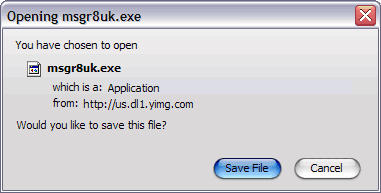
So we went through all the steps that Jack was going through. It transpired that Jack was saving the file, but there was no call to action to actually launch it.

Firefox save dialog box

And there on Jacks desktop were eight saved versions of msgr8.exe.

Jack often wondered what these files on his desktop were, but assumed they were important (he hadn’t put them there, the system had) and didn’t want to open them, let alone delete them.

Was Jack’s mistake such a big one; to assume that “saving” a downloaded application was the same as installing it? In developer mind, probably. But in consumer mind? Clearly not.

We talk a lot about beginner mind / expert mind, shu ha ri… But thinking about Jack, there is another mind that needs to be considered. Consumer mind. Expert in the things I do everyday, clueless in anything beyond my immediate sphere of need or want.

This impatient monkey

I’m impatient.  I also expect technology to work.  When it doesn’t appear to be working, when I’m getting no feedback as to what is happening, I get frustrated.  I click-click-click the mouse button.  I hammer the enter key.  I repeatedly thump the keyboard.  “Work damn you!” I curse.

The technology was probably just creaking along, it may have got there in the end, but my hammering is the last straw, it breaks the application. Frozen out, frustration turns to user anger.

The developer tuts, “it’s your own fault” he says, “you broke it with your impatience”.  And that is why Dan North’s recent blog about Monkey Testing fills me with happiness.  Testing software for my monkey behaviour, so that it doesn’t break when I do things that I’m not supposed to do – because I am human.

Just because you can, doesn’t mean that you should

Following a recent Economist article, JP Rangaswami blogged about “can versus should“. His theme was around DRM and identity; just because the government can monitor your digital behaviour does not mean that they should. I like this, but think it can be extended to much of the IT domain.

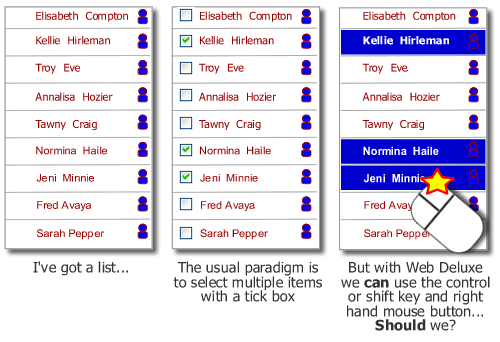
Web 2.0 introduces many new styles of interaction, drag and drop, take over the right-hand mouse button… just because we can do these things doesn’t necessarily mean that we should. What will the impact be? Hide calls to action behind the mouse button on your site and your site alone, how does the user know to find them there? When building a “deluxe web” site at the forefront of mind should be how will people actually interact with the proposition. Just because we can do some technically cool stuff that would give us a buzz and gain nods of appreciation from our technical colleagues, doesn’t mean that we should. A customer who has come to the proposition probably requires clarity and an ability to accomplish their goals. They care very little for the stuff we can do.

Multiple select on a list - check boxes or web deluxe take over the mouse?
And then there is mobile. Just because we can deliver the ability to enable customers to watch TV on their phones, doesn’t mean that we should. Too often new propositions are driven by IT ability rather than consumer demand. WAP was a great example of this; IT consultants getting excited about delivering content on mobile phones using WAP, completely overlooking what a shocking experience it was and simultaneously missing what consumers actually wanted to do – text message.

blog style

My latest post resulted in a comment accusing me (in jest I am sure) of being a usability nutter.  The comment was a fair one.  But it raises a couple of questions about blogging;

1.  Should I edit the offending blog in the light of the comment?  Probably  not.  I’ve responded to the comment and I’ll leave it at that.

2.  More fundamentally, how should one blog?  I tend to bash out a stream of consciousness, usually using notepad on the train to work.  I then upload it and post it.  I’ve not yet put a spell-checker on Wordpress so often publish with typos.  I rarely  proof read (beyond a cursory glance) what I’ve written.  I contrast this with other bloggers who refine what they write and only publish when they are really happy with the article.  Personally, I like the urgency of blogging, just getting stuff out.  And if every now and then I get stuff wrong, I’ll be humbled and move on.
(BTW, I’m not a usability nutter:) )

Frustrations with a smaller “Enter” key

I  was recently in Hong Kong; my Chinese colleague had the same laptop as me, a Dell D610, yet using her machine caused no end of frustration.  whilst my laptop has a big “enter” key in the shape of an inverse L, her keyboard only has a small key the same size as the backspace key.  When I went to press Enter, more often than not I hit “\”.  There was probably a good reason for this design decision being made, but it breaks a fundamental usability concept – that of consistency.
chinese and english dell laptop keyboards

The Total Experience

The customer experience doesn’t start on the home page and finish on the payment confirmation page. A compelling customer experience comprises of a number of factors with the different factors residing in, and owned by different parts of the business. This can result in parts of the experience being excellent, others being shocking, such as at the Early Learning Centre. Projects that are driven forward by “IT” rarely see the bigger picture; the project manager’s primary concern is with delivery. And this means producing a product that covers all the use cases or stories that were specified in the plan. Agile development practices often reinforce this; an agile team is (rightly) focussed upon delivering technical excellence according to the “customer’s” requirements. The trouble with this is that project success in the on-line world goes beyond just delivering working software. Success is all about the total experience.

I’m sure there are a hundred and one different frameworks for “e” success. The following works pretty well for me.
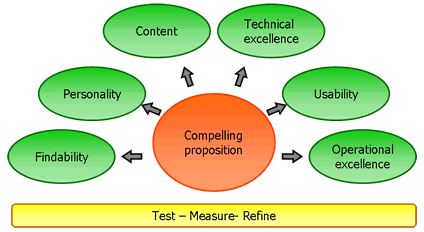
The Total Experience Model.  Copyright Marc McNeill!

Compelling proposition
Any on-line offering starts with its proposition; what it is offering to the market place. Do we know who the consumers are (segment), how many of them are (market size) and their propensity to buy? What is going to attract them to the site, and what is the glue that will draw them back.

Findability

Well if no one can find your compelling proposition it’s never going to make you money. Do you have a strategy in place for ensuring consumers can find your proposition? This starts with search engine optimisation, but will extend to affiliate programs and making a noise about you (Product team blogging?). And then when they are at your site is navigation intuitive? Is relevant and wanted content findable?
Personality
What is the product aesthetic, what does it look like? Is it branded? Does it exhibit production values that reinforce the brand? How does the overall experience make me feel – how does it emotionally engage me?

Content
Content is king. But all too often it is a bit of an afterthought. It’s not just syndicated content, or articles that subject matter experts might write, it is all the copy, the words that appear on the site. Do they support the proposition, or are they just placeholders that the developers wrote and never got updated? Related to content, and maybe it should have a bubble unto itself is community. I think that increasingly, successful eCommerce offerings will include an element of community. Fulfilling the promise of the ClueTrain manifesto from several years back?

Technical Excellence
Working for a company that undoubtedly employs some of the finest developers in the market place, this is something I see a lot of. But it means nothing if the other elements are not realised. Technical excellence includes those “non functional requirements” that development projects talk about; reliability, performance, scalability etc etc.

Usability
Learnable, speaks the user language, memorable, all those old chestnuts. Probably the maxim is “don’t make me think”. Aligned to usability is accessibility; we don’t want to exclude potential consumers through sloppy implementation.

Operational excellence
So the on-line experience may be compelling, but what happens then. Is the fulfilment channel fulfilling? Is there a promise to deliver goods and is the promised delivered upon? What about support channels? Do they support or do they just pay lip service to the concept? Does the web experience go beyond the web and cross other channels? Can consumers start a journey on the website and seamlessly conclude the experience in store? My blogs on Early Learning Centre, Norwich Union and a seamless experience all touch on operational excellence.

Test – measure – refine

Underpinning these factors is the need to constantly test what we do. We can all learn from Test Driven Development (TDD); write the test first and only have the confidence to proceed when it passes. How do we know it has passed? Well we need to measure it; we can only know success if we can quantify it. Based upon the feedback we refine; test – measure – refine, a concept core to agile software development practices.

A lot of words and a picture that belie a simple concept. When working in the web world, always think about the total experience. Break out of your silo (be it technical development or marketing strategy) and think holistically. What will the end to end experience be for your consumers? A technically excellent website is not success. A polished, well branded look and feel is not success. Success is compelling total experience.
What does red mean to you?

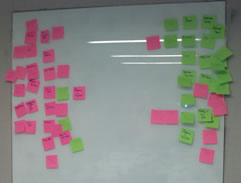
I’ve recently been in Hong Kong and ran a really quick retrospective with the project team. I handed out red and green post-it notes and asked the team to write down things that went well and things that went not so well. They then stuck the post-its on the board, red “not so wells” on the left and green “goods” on the right. Only it didn’t quite work like that. In my western mind I’d assumed that green is good and red is bad. Not so in China where red is an auspicious and lucky colour…

Red and green post-its confused in a project retrospective.  cultural differences were forgotten

Off is on in Motorola world

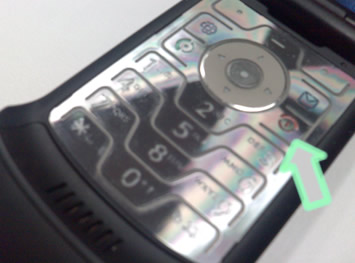
I recently borrowed a motorola flip phone. The first non-Nokia I’ve ever used. I really liked it, once I’d worked out how to switch it on. How intuitive is it to switch the phone on using the red off button? How hard would it to have built the green button to have a call to action for on?

motorola red off / on button


RSS Feed. This blog is proudly powered by Wordpress and is based on the theme Modern Clix..